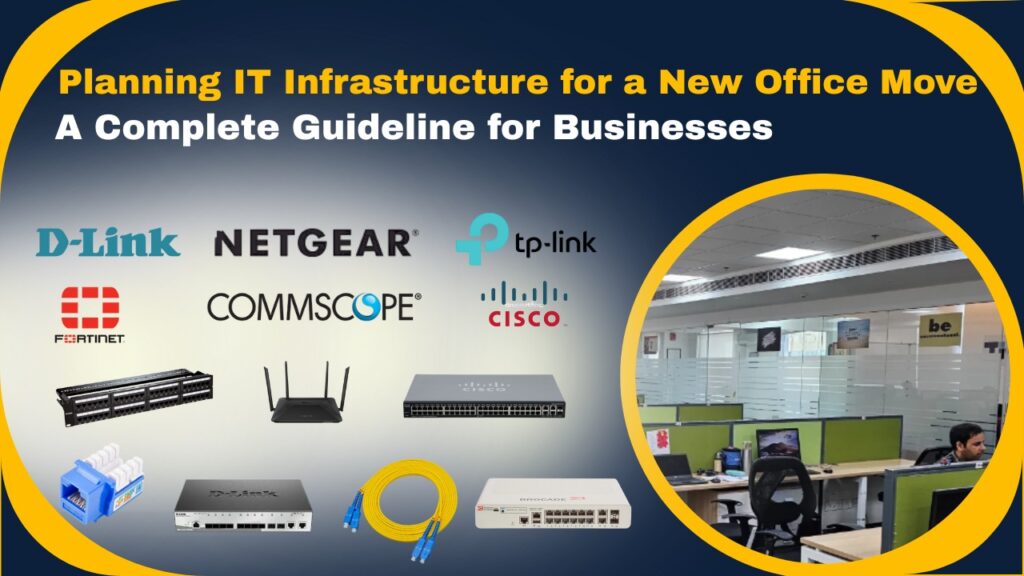
Sifting to a new office is an exciting step for any business. However, if IT infrastructure is not planned properly, the move can become expensive and work mishaps. A well-planned IT setup helps ensure smooth day to day operations, keeps data safe, supports future growth, and improves overall efficiency and server room cooling monitoring system with low cost. This guideline will help you plan your IT infrastructure in a smart and practical way, so your office relocation or new office IT infrastructure is smooth and hassle-free.
Why IT Infrastructure Planning is Critical During an Office Move or New Office Setup
IT infrastructure is the backbone of modern businesses. Poor planning can lead to downtime, data loss, security risks, and productivity issues. Proper IT planning ensures:
- Zero or minimal business disruption
- Secure data migration
- Optimised performance
- Future-ready scalability
Analyse Business & IT Requirements
Before relocating or new office setup, assess your current and future needs. Plan for 20–30% growth to avoid frequent upgrades.
- Number of users and devices
- Business applications (Tally, ERP, CRM, email)
- Storage and data growth
- Remote or hybrid work requirements
- Compliance and security needs
- Server Room & Network Rack Planning for Space and cooling system
Three Basic Rules for Any Office – IT Infrastructure, Data Security & Cloud Backup
- First Step: Ensure easy and secure access to high-speed internet and data through reliable hardware, updated software, and a well-structured LAN/Wi-Fi network.
- Second Step: Ensure strong threat protection by implementing Antivirus and Firewall solutions. (Along with robust Endpoint Security and Gateway Security systems.)
- Third Step: A smart businessman never waits for a data breach, virus attack, or ransomware incident to take action. Before any crisis happens, they secure their business with reliable Local and Cloud Data Backup solutions. More advanced businesses go one step further by implementing Disaster Data Recovery (DDR) with encrypted backup modes. In this secure setup, even if a virus or ransomware attack occurs, the protected backup data remains safe and recoverable, ensuring business continuity without panic or major loss.
Network & Internet Infrastructure Setup
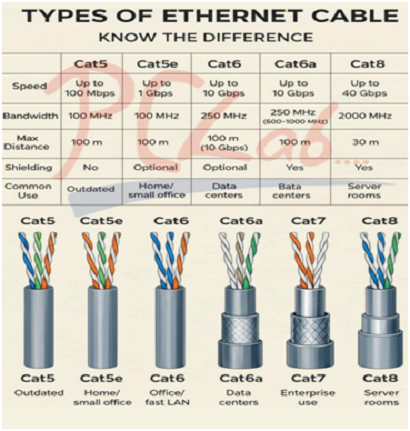
A reliable network guarantees consistent connectivity. Always opt for reputable passive components such as Cat-6, OFC, patch panels, patch cords, and network racks from brands like D-Link, CommScope, Digisole, Comrack, Dynamic Rack, and many others, depending on your budget.
- Highspeed primary internet (fibre/leased line)
- Backup internet connection for failover
- Enterprise grade router and managed switches
- Structured LAN cabling (Cat6 or higher)
- Wi-Fi 6 access points for full office coverage
- Ferruling for both ends (Network rack & User side)
- Panta scan (Testing for Data Loss) for all network points.

Server, Cloud & Hybrid Infrastructure
In an IT infrastructure, it is important to have server architecture along with a cloud application or a backup solution. In this scenario, always opt for a more robust firewall to manage all traffic. Solutions based in the cloud lower maintenance expenses and allow secure access from any location.
- On-premise servers for local control of the user brand, like HP/Dell/ Lenovo
- Cloud solutions (AWS, OCI, Azure) for flexibility
- Hybrid infrastructure for cost efficiency and scalability
End-User Systems & Office Hardware
These are the computing devices used directly by employees or users to perform tasks such as creating documents, communicating, analyzing data, and running business software. We provide end to end IT hardware procurement and enablement at competitive, cost effective pricing.
- Business-grade desktops and laptops user brand, like HP/Dell/ Lenovo
- Network printers and scanners user brand, like HP/Epson/Canon
- UPS for critical systems
Data Backup & Cyber Security Planning
There should be a comprehensive data backup and a cyber security plan to protect business data, ensure continuity, and minimize risk from cyber threats.
- Enterprise firewall with UTM
- Endpoint protection and antivirus
- Cloud and local backup strategy (3-2-1 rule)
- Role-based user access control
Power, Safety & Physical Infrastructure
There should be power (Online UPS), safety (CCTV surveillance & Access control systems) and physical infrastructure solutions that keep your IT systems protected and running without interruption.
- Server rack with proper ventilation
- Online UPS for servers and networking devices
- CCTV surveillance and access control systems
- Biometric attendance and door access
Documentation & IT Policies
There should bea process to create and maintain structured IT documentation and well-defined IT policies to ensure compliance, security, and smooth IT operations
- Network architecture diagram
- IP address allocation
- Asset and license management
- IT usage and security policies
- Vendor support and AMC details
Budgeting & Vendor Selection
There should be assistance for businesses with IT budgeting and vendor selection to optimize costs, ensure quality, and maximize return on investment.
- Capex vs OpenX planning
- Single-point IT service provider
- Vendors offering design, deployment, cloud, and support
Choosing the right IT partner ensures accountability and long-term reliability.
Conclusion
Planning IT infrastructure for a new office move is not just about shifting equipment, it’s about building a secure, scalable, and future-ready digital foundation. With the right strategy and expert support, businesses can turn an office move into a growth opportunity.
Need Expert IT Infrastructure Planning?
We help businesses design, deploy, and manage complete IT infrastructure solutions—including networking, cloud, security, and end-user systems ensuring a smooth and stress-free office transition.